
Learn Linux in One Week and Go From Zero to Hero – Get This Book

How To Install and Use Android Debug Bridge (adb) in Linux





Android Debug Bridge (adb) is the most used command-line tool that enables the communication between a personal computer and a connected Android-powered device or emulator instance over a USB cable or TCP/IP (wirelessly).
It supports various device actions such as networking, scripting, installing and debugging apps, and file transfer. It also provides access to a Unix shell that can be used to run a variety of Linux commands on a device.
adb is a client-server tool that includes three main components:
- a client that runs on your development machine and sends commands. You can execute it from a command line by running an adb command.
- a daemon (adbd) that runs as a background process on each device and executes commands on a device.
- a server that manages communication between the client and the daemon, it runs as a background process on your development machine.
The adb command-line tool ships with the standalone Android SDK Platform Tools package, a component of the Android SDK. Let’s look at how to grab and install the latest version of the Android SDK Platform Tools package in Linux.
Install Android Debug Bridge (adb) in Linux
To install the adb package, run the appropriate command for your Linux distributions, as follows:
$ sudo apt install adb         [On Debian, Ubuntu and Mint]
$ sudo yum install adb         [On RHEL/CentOS/Fedora and Rocky/AlmaLinux]
$ sudo emerge -a dev-util/android-tools  [On Gentoo Linux]
$ sudo apk add adb            [On Alpine Linux]
$ sudo pacman -S android-tools            [On Arch Linux]
$ sudo zypper install adb      [On OpenSUSE]
null
Note: If you wish to use the latest version of adb, move to the next section to download and set up the latest binary from the Android SDK Platform Tools package release.
Install Android SDK Platform Tools in Linux
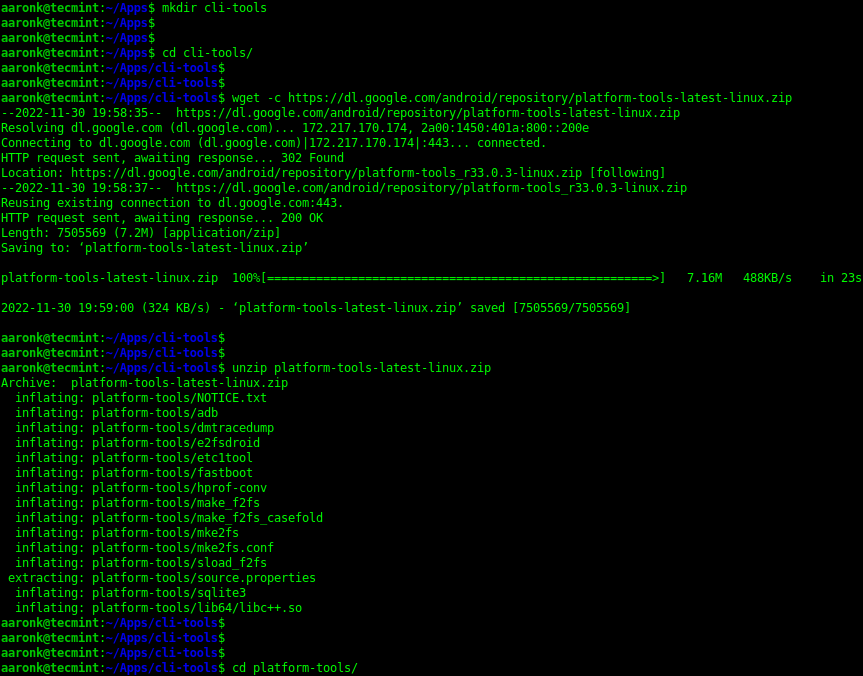
You can download the most recent version of the Android SDK Platform command-line tools from the SDK Platform Tools release page. Alternatively, run the following commands to download the archived package, extract it, and move it into the extracted folder:
$ mkdir cli-tools
$ wget -c https://dl.google.com/android/repository/platform-tools-latest-linux.zip
$ unzip platform-tools-latest-linux.zip
$ cd platform-tools/
Download SDK Platform Tools in Linux
After extracting the archive file, you can list the content of the extracted folder and the adb command should be in there as shown in the following screenshot:
$ ls
Confirm adb Command
To check the version of the adb command-line tool you have just installed, run the following command:
$ ./adb version

Android Debug Bridge version 1.0.41
Version 34.0.1-9680074
Installed as /home/tecmint/Downloads/platform-tools/adb
How to Use Android Debug Bridge (adb) in Linux
In the following examples, we will run the latest version of the adb command installed using the instructions in the previous section.
Once you have adb installed on your Linux system, connect your device to the computer via a USB cable and enable USB debugging in the device system settings, under Developer options.
Next, run the following commands to list the devices connect to the computer, make sure to check on the devices for any prompts to allow access.
$ ./adb devices
List Connected Android Devices
From the output of the previous command, the string RZ8NA0V3HEY is created by adb to uniquely identify the device by its port number. The next column shows the device meaning the device is connected to the adb server. Other possible values are offline (device not connected or is not responding) and no device (means no device is connected).
To show more information about the device (device description for example product:a71naxx model:SM_A715F device:a71 transport_id:1), add the -l flag.
This is useful if many devices are attached to the computer:
$ ./adb devices -l
List Android Device Info
To install an Android app using adb, use the install sub-command as follows. If you are installing a test app, remember to add the -t flag:
$ ./adb install ~/MusiX.apk
OR
$ ./adb install -t /path/to/testapp.apk
Install Android App Using adb Command
If you have multiple devices connected to the computer, use the -s option to specify the device’s serial number:
$ ./adb -s RZ8NA0V3HEY install ~/MusiX.apk
In case your connection to a device is lost, you can reset your adb host and start over from the beginning:
$ adb kill-server
To view all available command-line options, issue the following command:
$./adb --help
[ You might also like: Scrcpy – Display and Control Your Android Device via Linux Desktop ]
That’s it for now! For more information, check out the online adb documentation, which contains more use cases and command-line examples. Post navigation
12 Best Linux Server Distributions of 2023
How To Restore a Particular Schema from a PostgreSQL Database Backup
Tutorial Feedback…
Was this article helpful? If you don’t find this article helpful or found some outdated info, issue or a typo, do post your valuable feedback or suggestions in the comments to help improve this article…
null
If You Appreciate What We Do Here On TecMint, You Should Consider:
TecMint is the fastest growing and most trusted community site for any kind of Linux Articles, Guides and Books on the web. Millions of people visit TecMint! to search or browse the thousands of published articles available FREELY to all.
If you like what you are reading, please consider buying us a coffee ( or 2 ) as a token of appreciation.

We are thankful for your never ending support.
Related Posts

How To Remove SSL Certificate and SSH Key Passphrase in Linux
How to Kill Linux Process Using Kill, Pkill and Killall
3 thoughts on “How To Install and Use Android Debug Bridge (adb) in Linux”
- jim Hi,The correct command to install adb (Android Debug Bridge) in Arch Linux is:$ sudo pacman -S android-tools or $ yay -S android-tools
- jim Hi,I can’t find adb package in Arch Linux.# yay -S adb -> Could not find all the required packages: adb (Target) Thanks in advance.
Got something to say? Join the discussion.
Have a question or suggestion? Please leave a comment to start the discussion. Please keep in mind that all comments are moderated and your email address will NOT be published.
CommentName Email
Save my name, email, and website in this browser for the next time I comment.
Notify me of followup comments via e-mail. You can also subscribe without commenting.
null
A Beginners Guide To Learn Linux for Free [with Examples]
null
Red Hat RHCSA/RHCE 8 Certification Study Guide [eBooks]
Linux Foundation LFCS and LFCE Certification Study Guide [eBooks]
Linux Commands and Tools
Find Top Running Processes by Highest Memory and CPU Usage in Linux
Pscp – Transfer/Copy Files to Multiple Linux Servers Using Single Shell
10 Interesting Linux Command Line Tricks and Tips Worth Knowing
How to Run Commands from Standard Input Using Tee and Xargs in Linux
6 Useful X-based (Gui Based) Linux Commands – Part II
LFCA: Learn Basic Network Troubleshooting Tips – Part 12
Linux Server Monitoring Tools
ctop – Top-like Interface for Monitoring Docker Containers
Monit – A Open Source Tool for Managing and Monitoring Linux System
How to Limit Time and Memory Usage of Processes in Linux
Bandwhich – A Network Bandwidth Utilization Tool for Linux
Mytop – A Useful Tool for Monitoring MySQL/MariaDB Performance in Linux
How to Configure Custom Access and Error Log Formats in Nginx
Learn Linux Tricks & Tips
4 Ways to Generate a Strong Pre-Shared Key (PSK) in Linux
How to Auto Execute Commands/Scripts During Reboot or Startup
2 Ways to Create an ISO from a Bootable USB in Linux
fd – A Simple and Fast Alternative to Find Command
Bash-it – Bash Framework to Control Your Scripts and Aliases
Learn Why ‘less’ is Faster Than ‘more’ Command for Effective File Navigation
Best Linux Tools
Useful GUI Tools to Free Up Space on Ubuntu and Linux Mint
Best Skype Alternatives for Linux Desktop
5 Best Platforms for Hosting Your Web Development Projects
Best Command-Line FTP Clients for Linux
19 Best Open Source WYSIWYG HTML Editors in 2023
13 Best Photo Image Editors for Linux
- Donate to TecMint
- Contact Us
- Advertise on TecMint
- Linux Services
- Copyright Policy
- Privacy Policy
- Career
- Sponsored Post
Tecmint: Linux Howtos, Tutorials & Guides © 2023. All Rights Reserved.
The material in this site cannot be republished either online or offline, without our permission.
Hosting Sponsored by : Linode Cloud Hosting
 R.M.P Marotta Long Island
Leave a comment