

Download Link: Windows / Mac / Linux
Android Studio Meerkat | 2024.3.1
Android Studio Meerkat | 2024.3.1 Patch 1 and AGP 8.9.1 (March 2025)
Android Studio is the official IDE for Android development, and includes everything you need to build Android apps.
This page lists new features and improvements in the latest version in the stable channel, Android Studio Meerkat. You can download it here or update to it inside Android Studio by clicking Help > Check for updates (Android Studio > Check for updates on macOS)
This is a stable release of Android Studio. Note that patches might contain new minor features and bug fixes. See Android Studio release names to understand Android Studio version naming.
To see what’s been fixed in this version of Android Studio, see the closed issues.
To view the release notes for older versions of Android Studio, see Past releases.
For early access to upcoming features and improvements, see the Preview builds of Android Studio.
If you encounter problems in Android Studio, check the Known issues or Troubleshoot page.
Android Gradle plugin and Android Studio compatibility
The Android Studio build system is based on Gradle, and the Android Gradle plugin (AGP) adds several features that are specific to building Android apps. The following table lists which version of AGP is required for each version of Android Studio. If your project is not supported by a specific version of Android Studio, you can still open and update your project using an older version of Android Studio. Android Studio version Required AGP version Meerkat | 2024.3.1 3.2-8.9 Ladybug Feature Drop | 2024.2.2 3.2-8.8 Ladybug | 2024.2.1 3.2-8.7 Koala Feature Drop | 2024.1.2 3.2-8.6 Koala | 2024.1.1 3.2-8.5 Jellyfish | 2023.3.1 3.2-8.4 Iguana | 2023.2.1 3.2-8.3 Hedgehog | 2023.1.1 3.2-8.2 Giraffe | 2022.3.1 3.2-8.1 Flamingo | 2022.2.1 3.2-8.0 Older versions
For information on what’s new in the Android Gradle plugin, see the Android Gradle plugin release notes.
Minimum versions of tools for Android API level
There are minimum versions of Android Studio and AGP that support a specific API level. Using lower versions of Android Studio or AGP than required by your project’s targetSdk or compileSdk could lead to unexpected issues. We recommend using the latest preview version of Android Studio and AGP to work on projects that target preview versions of the Android OS. You can install preview versions of Android Studio alongside a stable version.
The minimum versions of Android Studio and AGP are as follows: API level Minimum Android Studio version Minimum AGP version 36.0 Meerkat | 2024.3.1 Patch 1 8.9.1 35 Koala Feature Drop | 2024.2.1 8.6.0 34 Hedgehog | 2023.1.1 8.1.1 33 Flamingo | 2022.2.1 7.2
The following are new features in Android Studio Meerkat.
Patch releases
The following is a list of the patch releases in Android Studio Meerkat and Android Gradle plugin 8.9.
Android Studio Meerkat | 2024.3.1 Patch 1 and AGP 8.9.1 (March 2025)
This minor update includes these bug fixes.
Compose Preview enhancements
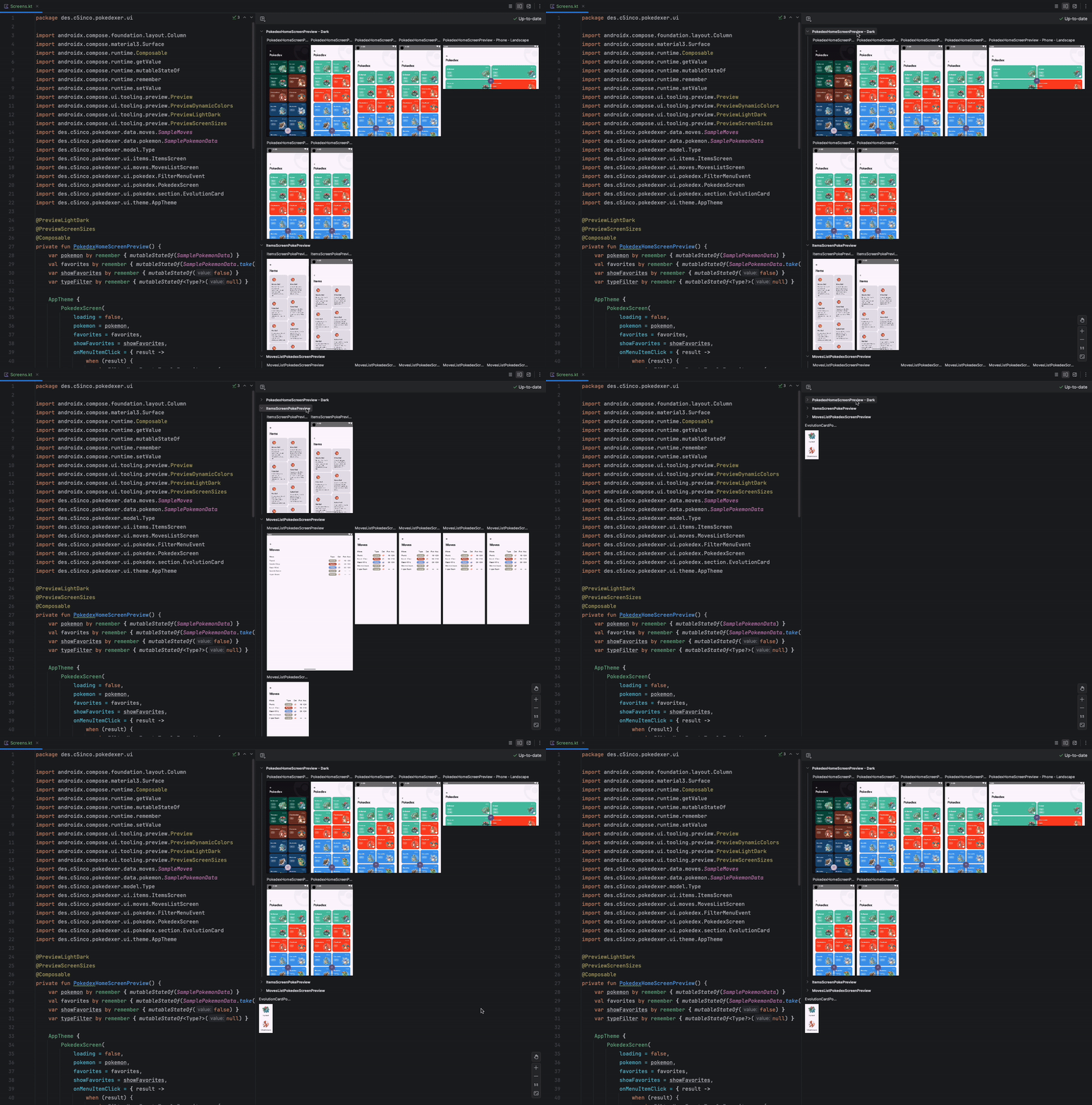
Android Studio Meerkat includes some optimizations of Compose Preview to improve your workflow:
- Enhanced zoom: Enjoy smoother and more responsive zooming in your Compose Previews.
- Previews collapsible groups: Organize your preview surface more effectively! Collapse groups of composables under their titles, reducing clutter and making it easier to focus on specific components.
- View modes: To streamline your preview experience, Grid mode is the default view, Gallery mode is accessed by right-clicking preview, and List view has been removed. This provides a clearer and more organized way to view your composables.
These enhancements make it easier than ever to build and iterate on your Compose UIs. Collapsible groups in Compose Previews.
KMP Shared Module integration with Android applications
Android Studio now includes a new module template for adding shared logic to your app using Kotlin Multi-Platform (KMP). To try out this feature, follow these steps to create a KMP Shared Module in a newly created Android app:
- Make sure you’re using the latest version of Android Studio Meerkat and that your app uses the latest version of Android Gradle Plugin.
- Open Android Studio and create a new Android project with the Empty Activity template.
- Switch from the Android view to the Project view to access the project structure.
- Click the New button in the Project view and select Kotlin Multiplatform Module from the options. Choose Shared Module as the type and keep the default settings.
- Open the
build.gradle.ktsfile in the Android app directory and add a dependency on the shared module. - In the shared module, edit the
Platform.android.ktfile and add the following line of code:actual fun platform() = "Android from Shared KMP Module" - Open the
MainActivity.ktfile in the Android app directory and modify it to call theplatform()function from the shared module. - Build the project and run the Android application. You should see the message, “Hello Android from Shared KMP Module!” displayed on the screen.
These shared modules contain shared business logic that can be used by both Android and iOS platforms.
Updated UX for adding virtual and remote devices to Device Manager
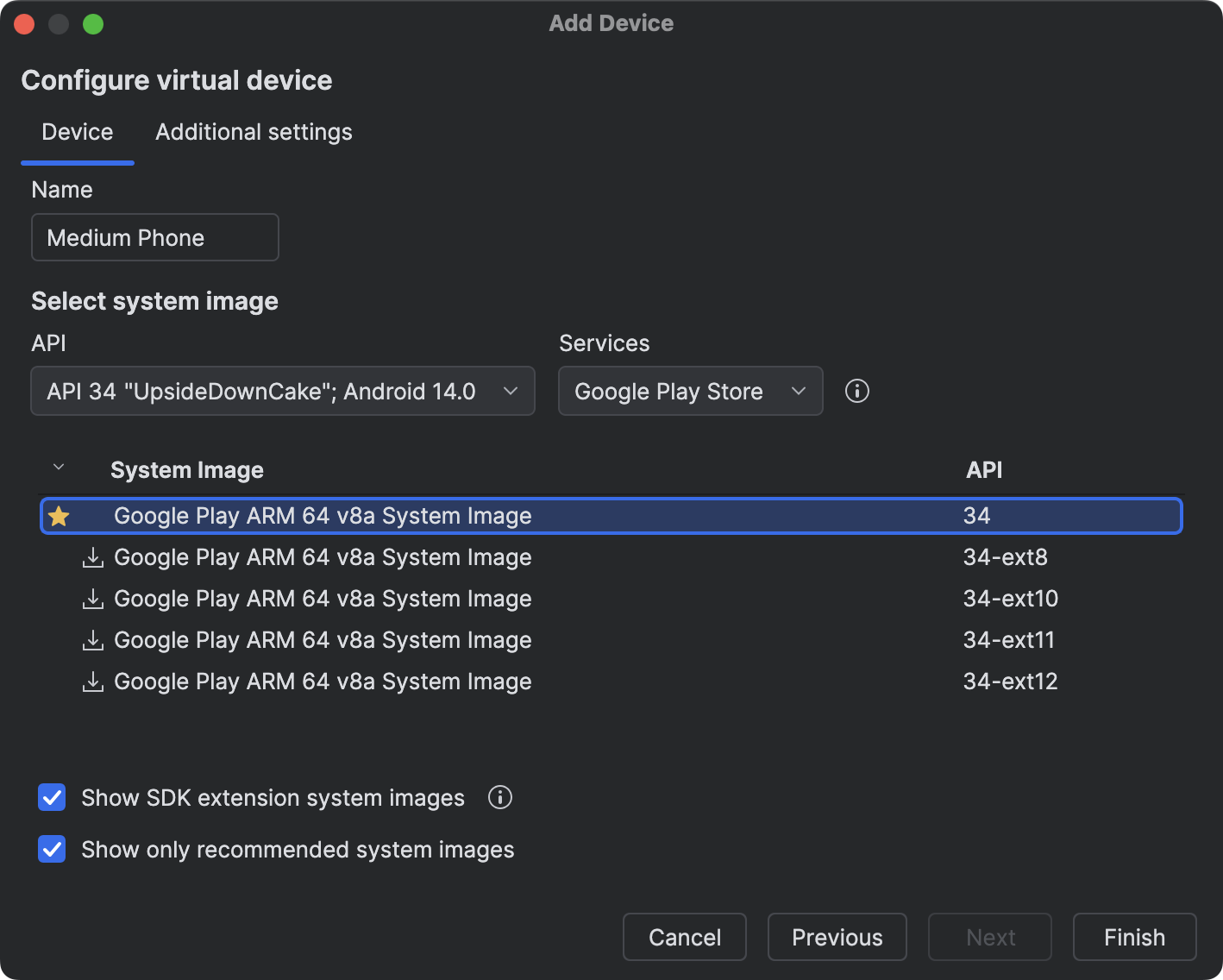
Android Studio improves the UX when creating a local virtual device or adding a device from Android Device Streaming.
To get started, click the + button from the Device Manager, and select either Create Virtual Device or Select Remote Devices.
When creating a new virtual device, new filters and recommendations make it easier to create a device configuration that fits your needs and performs the best on your workstation. Identify and select the optimal system image for your virtual device using the UI.
Similarly, when selecting remote devices from Android Device Streaming, new filters make it easier to find and select the devices you need. You now only need to click the Firebase button at the top of the Device Manager window to select the Firebase project you want to use for Android Device Streaming.
New Gemini in Android Studio features
Android Studio Meerkat introduces new features that use Gemini to help you be more productive. To use these features, enable sharing code context with Gemini in your current project.
Use the following links to learn more about these features:
Updated Build menu and actions
We made the following changes to the build actions and the Build menu to help make it easy to build exactly what you want as you work on projects in Android Studio:
- Added a new
Build 'run-configuration-name' Run Configurationaction: This action builds the currently selected run configuration. For example, if you have the:apprun configuration selected, the action will build and assembleapp. If you have recently run a test on a device the action will build those tests. - Made
Build 'run-configuration-name' Run Configurationthe default Build action: To better match developer’s intent, both the toolbar button and the shortcut Control/Command+F9 now execute the newBuild run-configuration-name Run Configurationaction. - Reordered build actions: We placed the new
Build run-configuration-nameaction at the top of the Build menu, next the Compile actions, and next the “Assemble …” actions (previous “Make …” actions). We also renamed the “Rebuild Project” action to “Clean and Assemble Project with Tests” to more clearly reflect what the action does. - Used verbs that match what the build actions actually do: In addition to “Build” and “Compile” actions, we renamed
Make ProjecttoAssemble Project. We also introduced a newAssemble Project with Testsaction to assemble test components as well.
Google Play SDK Insights: Deprecated SDK warnings
SDK authors can now indicate when an SDK has been deprecated and mention alternative SDKs to use instead. If any of the SDKs used by your app have been deprecated by their authors, you’ll see corresponding warnings in Android Studio along with information about other SDKs that can be used instead.
Was this helpful?
Content and code samples on this page are subject to the licenses described in the Content License. Java and OpenJDK are trademarks or registered trademarks of Oracle and/or its affiliates.
Last updated 2025-03-26 UTC.


Was this helpful?
Android Studio Meerkat | 2024.3.1
Android Studio is the official IDE for Android development, and includes everything you need to build Android apps.
This page lists new features and improvements in the latest version in the stable channel, Android Studio Meerkat. You can download it here or update to it inside Android Studio by clicking Help > Check for updates (Android Studio > Check for updates on macOS)
This is a stable release of Android Studio. Note that patches might contain new minor features and bug fixes. See Android Studio release names to understand Android Studio version naming.
To see what’s been fixed in this version of Android Studio, see the closed issues.
To view the release notes for older versions of Android Studio, see Past releases.
For early access to upcoming features and improvements, see the Preview builds of Android Studio.
If you encounter problems in Android Studio, check the Known issues or Troubleshoot page.
Android Gradle plugin and Android Studio compatibility
The Android Studio build system is based on Gradle, and the Android Gradle plugin (AGP) adds several features that are specific to building Android apps. The following table lists which version of AGP is required for each version of Android Studio. If your project is not supported by a specific version of Android Studio, you can still open and update your project using an older version of Android Studio. Android Studio version Required AGP version Meerkat | 2024.3.1 3.2-8.9 Ladybug Feature Drop | 2024.2.2 3.2-8.8 Ladybug | 2024.2.1 3.2-8.7 Koala Feature Drop | 2024.1.2 3.2-8.6 Koala | 2024.1.1 3.2-8.5 Jellyfish | 2023.3.1 3.2-8.4 Iguana | 2023.2.1 3.2-8.3 Hedgehog | 2023.1.1 3.2-8.2 Giraffe | 2022.3.1 3.2-8.1 Flamingo | 2022.2.1 3.2-8.0 Older versions
For information on what’s new in the Android Gradle plugin, see the Android Gradle plugin release notes.
Minimum versions of tools for Android API level
There are minimum versions of Android Studio and AGP that support a specific API level. Using lower versions of Android Studio or AGP than required by your project’s targetSdk or compileSdk could lead to unexpected issues. We recommend using the latest preview version of Android Studio and AGP to work on projects that target preview versions of the Android OS. You can install preview versions of Android Studio alongside a stable version.
The minimum versions of Android Studio and AGP are as follows: API level Minimum Android Studio version Minimum AGP version 36.0 Meerkat | 2024.3.1 Patch 1 8.9.1 35 Koala Feature Drop | 2024.2.1 8.6.0 34 Hedgehog | 2023.1.1 8.1.1 33 Flamingo | 2022.2.1 7.2
The following are new features in Android Studio Meerkat.
Patch releases
The following is a list of the patch releases in Android Studio Meerkat and Android Gradle plugin 8.9.
Android Studio Meerkat | 2024.3.1 Patch 1 and AGP 8.9.1 (March 2025)
This minor update includes these bug fixes.
Compose Preview enhancements
Android Studio Meerkat includes some optimizations of Compose Preview to improve your workflow:
- Enhanced zoom: Enjoy smoother and more responsive zooming in your Compose Previews.
- Previews collapsible groups: Organize your preview surface more effectively! Collapse groups of composables under their titles, reducing clutter and making it easier to focus on specific components.
- View modes: To streamline your preview experience, Grid mode is the default view, Gallery mode is accessed by right-clicking preview, and List view has been removed. This provides a clearer and more organized way to view your composables.
These enhancements make it easier than ever to build and iterate on your Compose UIs. Collapsible groups in Compose Previews.
KMP Shared Module integration with Android applications
Android Studio now includes a new module template for adding shared logic to your app using Kotlin Multi-Platform (KMP). To try out this feature, follow these steps to create a KMP Shared Module in a newly created Android app:
- Make sure you’re using the latest version of Android Studio Meerkat and that your app uses the latest version of Android Gradle Plugin.
- Open Android Studio and create a new Android project with the Empty Activity template.
- Switch from the Android view to the Project view to access the project structure.
- Click the New button in the Project view and select Kotlin Multiplatform Module from the options. Choose Shared Module as the type and keep the default settings.
- Open the
build.gradle.ktsfile in the Android app directory and add a dependency on the shared module. - In the shared module, edit the
Platform.android.ktfile and add the following line of code:actual fun platform() = "Android from Shared KMP Module" - Open the
MainActivity.ktfile in the Android app directory and modify it to call theplatform()function from the shared module. - Build the project and run the Android application. You should see the message, “Hello Android from Shared KMP Module!” displayed on the screen.
These shared modules contain shared business logic that can be used by both Android and iOS platforms.
Updated UX for adding virtual and remote devices to Device Manager
Android Studio improves the UX when creating a local virtual device or adding a device from Android Device Streaming.
To get started, click the + button from the Device Manager, and select either Create Virtual Device or Select Remote Devices.
When creating a new virtual device, new filters and recommendations make it easier to create a device configuration that fits your needs and performs the best on your workstation. Identify and select the optimal system image for your virtual device using the UI.
Similarly, when selecting remote devices from Android Device Streaming, new filters make it easier to find and select the devices you need. You now only need to click the Firebase button at the top of the Device Manager window to select the Firebase project you want to use for Android Device Streaming.
New Gemini in Android Studio features
Android Studio Meerkat introduces new features that use Gemini to help you be more productive. To use these features, enable sharing code context with Gemini in your current project.
Use the following links to learn more about these features:
Updated Build menu and actions
We made the following changes to the build actions and the Build menu to help make it easy to build exactly what you want as you work on projects in Android Studio:
- Added a new
Build 'run-configuration-name' Run Configurationaction: This action builds the currently selected run configuration. For example, if you have the:apprun configuration selected, the action will build and assembleapp. If you have recently run a test on a device the action will build those tests. - Made
Build 'run-configuration-name' Run Configurationthe default Build action: To better match developer’s intent, both the toolbar button and the shortcut Control/Command+F9 now execute the newBuild run-configuration-name Run Configurationaction. - Reordered build actions: We placed the new
Build run-configuration-nameaction at the top of the Build menu, next the Compile actions, and next the “Assemble …” actions (previous “Make …” actions). We also renamed the “Rebuild Project” action to “Clean and Assemble Project with Tests” to more clearly reflect what the action does. - Used verbs that match what the build actions actually do: In addition to “Build” and “Compile” actions, we renamed
Make ProjecttoAssemble Project. We also introduced a newAssemble Project with Testsaction to assemble test components as well.
Google Play SDK Insights: Deprecated SDK warnings
SDK authors can now indicate when an SDK has been deprecated and mention alternative SDKs to use instead. If any of the SDKs used by your app have been deprecated by their authors, you’ll see corresponding warnings in Android Studio along with information about other SDKs that can be used instead.
Was this helpful?
Content and code samples on this page are subject to the licenses described in the Content License. Java and OpenJDK are trademarks or registered trademarks of Oracle and/or its affiliates.
Last updated 2025-03-26 UTC.

 R.M.P Marotta Long Island
Leave a comment