

- iPhone 15
- iOS 17
- iPhone 15 Pro
- iPhone 16
- iPhone 16 Pro
- Apple Vision Pro
- macOS Sonoma
- visionOS
- watchOS 10
- MacBook Pro 14 & 16″
- HomePod
- iPhone 14
- Apple TV
- iPad Pro
- Apple Watch Ultra 2
- iPad
- AirPods 3
- Apple Car
- Apple Pro Display XDR
- HomePod mini
- Mac Pro
- MacBook Air
- MacBook Pro 13″
- iPhone 13
- AirPods Max
- AirPods Pro
- Apple Deals
- Apple Studio Display
- Apple Watch SE
- Mac Studio
- iMac
- iPad Air
- iPad mini
- iPhone SE
- Mac mini
- iOS 18
- Apple Watch Series 9
- CarPlay
- iPadOS 17
- Apple Pay
iOS 17.2: How to Use Apple’s New Journal App
Tuesday December 12, 2023 4:42 AM PST by Tim Hardwick
Apple introduced its long-awaited Journal app for iPhone in iOS 17.2. Here is everything you need to know about using Journal.
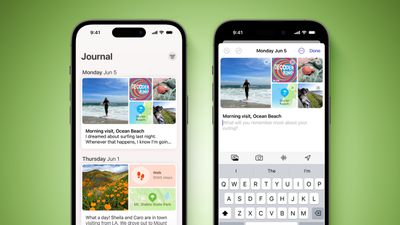
Apple in June 2023 announced it was bringing its own journaling app to iOS 17, and it is finally here as part of Apple’s December software update, iOS 17.2.
Apple’s Journal app lets you record your daily thoughts and activities, incorporating data like photos, music listened to, workouts, and more, plus it suggests topics to write about.
Creating Your First Journal Entry
The Journal app has a simple, straightforward interface. When you open it up, you’re presented with a “+” button, and tapping on it lets you start a new entry. When you have added a few entries, the button at the top-right lets you filter them based on photos and activities.
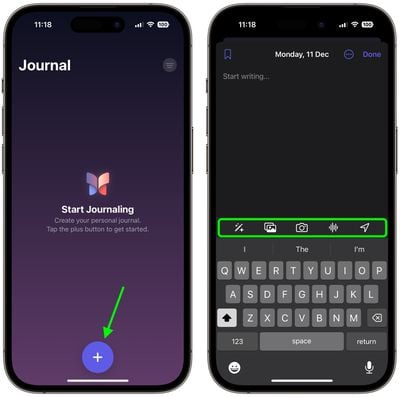
The writing interface includes several buttons along the top of the keyboard that you can use to access the aforementioned “moments,” as well as add photos, take pictures, add voice recordings, and add location tags, respectively. Before you can use them, you will be prompted to allow the app to access your pictures, camera, microphone, and location. Journal entries are automatically dated, and you can bookmark your favorite ones.
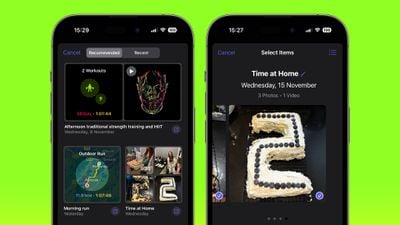
By default, the Journal app will suggest recent and recommended “moments” from your week that include photos, workouts, or places you visited, and you can use these as writing prompts or you can tap New Entry and start writing. (To write new entries without viewing suggestions first toggle on the switch in Settings ➝ Journal ➝ Skip Journaling Suggestions.)
Using Journaling Reflections
If you have a serious case of writer’s block, the Journal app can offer you entry prompts in the form of “reflections.” When starting a new entry, these reflections appear in between your recommended and recent “moments,” are designed to inspire and guide you, providing ideas and topics to explore in each entry.

The reflections can vary from thought-provoking questions to creative writing cues, and if the one you’re offered doesn’t get your gears turning, you can generate a new one by tapping the two arrows that form a circle.
Setting a Journaling Schedule
Staying consistent with journaling can be difficult, but your iPhone can make it a lot easier with the new Journal app’s scheduling feature. Here’s how to set it up.
- Open the Settings app on your iPhone.
- Scroll down and tap Journal.
- Tap Journaling Schedule, then toggle on the switch next to Schedule.
- Choose the days of the week that you want to be reminded to write, and select a time of day to receive the prompt.
The scheduling option isn’t just a reminder – it’s about building a habit. So whether it’s a gentle reminder notification that you need in the morning or a prompt before bed, you can adapt the feature to your personal routine.
Lock Your Journal
Privacy and security are paramount when it comes to personal journaling. That’s why Apple’s Journal app introduces enhanced security features, including encryption and password protection, to safeguard your journal from unauthorized access.
To lock your journal using your device’s passcode, Face ID, or Touch ID, follow these steps.
- Open the Settings app on your iPhone.
- Scroll down and tap Journal.
- Tap Lock Journal and enter your passcode when prompted.
- Toggle on the switch next to Lock.
- Tap Require Passcode, then select from the options: Immediately, After 1 minute, After 5 minutes, After 15 minutes.
That’s all there is to it. Your journal is now inaccessible without entering your device passcode, or using Face ID or Touch ID, providing you with peace of mind every time you record sensitive or personal information.
Get weekly top MacRumors stories in your inbox.
Top Rated Comments
16 minutes ago at 04:45 am
It’s a decent start. I would like to be able to separate out categories/#tags or multiple journals for work versus personal thoughts, as I’d like to journal professional growth and ideas separately from personal journaling.
Score: 2 Votes (Like | Disagree)
Popular Stories
Apple Releases iOS 17.2 With Journal App and More
Monday December 11, 2023 10:01 am PST by Juli Clover
Best Buy’s New Weekend Sale Has Record Low Prices on MacBook Pro and MacBook Air
Friday December 8, 2023 7:37 am PST by Mitchel Broussard
iOS 17.2 Will Add These 12 New Features to Your iPhone
Friday December 1, 2023 12:19 pm PST by Joe Rossignol
Top Stories: iOS 17.2 Coming Soon, New iPads in Early 2024, and More
Saturday December 9, 2023 6:00 am PST by MacRumors Staff
Apple Confirms It Shut Down iMessage for Android App Beeper Mini
Sunday December 10, 2023 3:44 am PST by Hartley Charlton
Apple Puts a Stop to Beeper Mini’s iMessage for Android Feature
Friday December 8, 2023 2:24 pm PST by Juli Clover
Apple Watch Ultra 2 Hits New Record Low Price of $699, Alongside Series 9 and SE Sales
Friday December 8, 2023 8:55 am PST by Mitchel Broussard
What’s Next for the iPad Magic Keyboard and Apple Pencil
Friday December 8, 2023 4:19 pm PST by Juli Clover
Guides
Our comprehensive guide highlighting every major new addition in iOS 17, plus how-tos that walk you through using the new features.
AirDrop over the internet, Apple Music favorites and playlist art, StandBy mode and Action button tweaks, and more.
iPhone 15 and iPhone 15 Pro: How to Use All the New Features
Get the most out your iPhone 15 with our complete guide to all the new features.
A deep dive into new features in macOS Sonoma, big and small.
• macOS Sonoma Features to Check Out First
• 22 Hidden Features in watchOS 10
• Apple Watch Series 9 vs. Apple Watch Ultra 2
• 14 macOS Tips to Make Your Life Easier
• 14″ MacBook Pro vs. 16″ MacBook Pro
Upcoming
November 24
Expect great deals on a variety of Apple products and third-party accessories as the holiday shopping season kicks into high gear.
Early 2024
The Apple Vision Pro AR/VR headset is set to launch in early 2024. It features dual 4K displays, gesture tracking, an M2 chip, and a $3,499 price tag.
Early 2024?
M3 models in 13.6″ and 15.3″ sizes.
Mid-2024
Revamped models with OLED displays, M3 chip, and redesigned Magic Keyboard accessory.
Other Stories
33 New Things Your iPhone Can Do in iOS 17.2
1 day ago by Tim Hardwick
iPhone 16 Pro Rumored to Have These 12 New Features
18 hours ago by Joe Rossignol
Does My iPhone or iPad Support Wi-Fi 6E?
5 days ago by Tim Hardwick
New MacBook Air Models Launching Next Year: 5 Features to Expect
5 days ago by Tim Hardwick
iPhone 16 Series Rumored to Have These 18 New Features
5 days ago by Tim Hardwick
MacRumors attracts a broad audience of both consumers and professionals interested in the latest technologies and products. We also boast an active community focused on purchasing decisions and technical aspects of the iPhone, iPad, Mac, and other Apple platforms.
About MacRumors.com
Our Staff
Editorial Director
Editor in Chief
Managing Editor
Senior Reporter
Deals Editor
Senior Editor
Senior Editor
Project Manager
Video Content Producer
Graphic Designer
Contributing Writer
Contributing Writer
Contributor
Related Links
‘Little Nightmares’ Mobile Is Now Available on iOS and Android
New ‘Honkai Star Rail’ Version 2.0 Features Detailed, Black Swan Showcased for Upcoming Update
SwitchArcade Round-Up: Reviews Featuring ‘Dragon Quest Monsters’, Plus New Releases, Sales, and More
The Best ‘Marvel Snap’ Meta Decks – December 2023 Edition
iOS 17.2 Available Now: Here’s What’s New!
Is Apple One Worth It? | The MacRumors Show Ep. 81
iPhone 15 Pro Max 2 Months later: Something’s Missing 🤔
iMessage for Android is Here Right Now | Beeper Mini
Best Apple Apps of 2023 – Try These Now!
Copyright © 2000-2023 MacRumors.com, LLC.
Privacy / DMCA contact / Affiliate and FTC Disclosure
Accessibility Statement
[ Featured On/Off ] [ Full Articles On/Off ] [ Fluid | Fluid HD ] [ Auto | Light | Dark ]
Information from your device can be used to personalize your ad experience.


Leave a comment